티스토리 뷰

Window.localStorage
https://developer.mozilla.org/ko/docs/Web/API/Window/localStorage
<!DOCTYPE html>
<html lang="en">
<head>
  <meta charset="UTF-8">
  <meta name="viewport" content="width=device-width, initial-scale=1.0">
  <title>Momentum App</title>
  <link rel="stylesheet" href="style.css">
  <style>
    .hidden { display: none;  }
  </style>
</head>
<body>
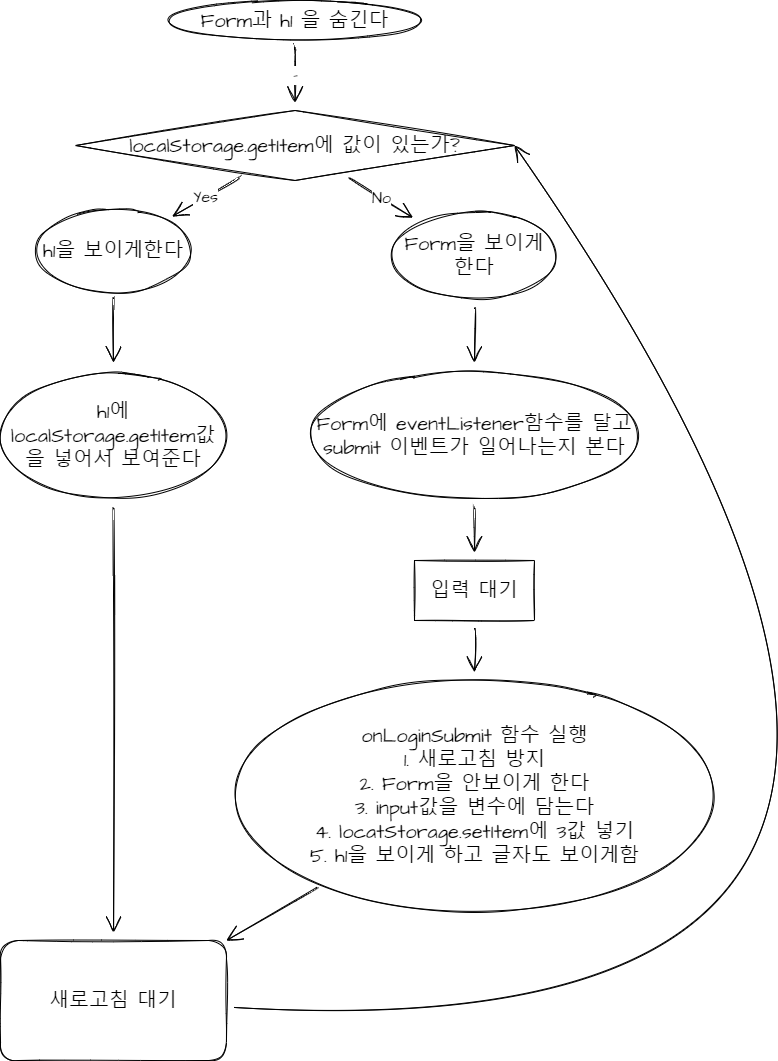
    <form class="hidden" id="login-form">
      <input required maxlength="15" type="text" placeholder="What is your name?"/>
      <input class="btn" type="submit" value="Log In" />
    </form>
    <h1 id="greeting" class="hidden"></h1>

  <script>
    const loginForm = document.querySelector('#login-form');
    const loginInput = document.querySelector('#login-form input');
    const greeting = document.querySelector('#greeting');

    const HIDDEN_CLASSNAME = 'hidden';
    const USERNAME_KEY = 'username';

    function onLoginSubmit(event) {
      event.preventDefault();

      loginForm.classList.add(HIDDEN_CLASSNAME);
      const username = loginInput.value;
      localStorage.setItem(USERNAME_KEY, username);
      paintGeetings(username);
    }

    function paintGeetings(username) {
      greeting.classList.remove(HIDDEN_CLASSNAME);
      greeting.innerText = `hello ${username}`;
    }

    const savedUsername = localStorage.getItem(USERNAME_KEY);

    if (savedUsername === null) { // show the form
      loginForm.classList.remove(HIDDEN_CLASSNAME);
      loginForm.addEventListener('submit', onLoginSubmit);
    } else { // show the greetings
      paintGeetings(savedUsername);
    }
  </script>
</body>
</html>
'WEB > JavaScript' 카테고리의 다른 글
| [크롬 앱 만들기] #7 TO DO LIST (0) | 2022.01.18 |
|---|---|
| [크롬 앱 만들기]#5 CLOCK | PadStart, 생성자 함수 (0) | 2022.01.17 |
| [크롬 앱 만들기] #4.1 Form Submission | form -> submit (0) | 2022.01.16 |
| [크롬 앱 만들기] #3.8 css in js | toggle function (0) | 2022.01.16 |
| [크롬 앱 만들기] #3.6 css in js | getter setter (0) | 2022.01.16 |
댓글