JavaScript Promise (callback & async)

출처: https://www.youtube.com/playlist?list=PLuHgQVnccGMBVQ4ZcIRmcOeu8uktUAbxI
JavaScript Promise (callback & async)
www.youtube.com
보충자료(캡틴판교): https://joshua1988.github.io/web-development/javascript/promise-for-beginners/
자바스크립트 Promise 쉽게 이해하기
(중급) 자바스크립트 입문자를 위한 Promise 설명. 쉽게 알아보는 자바스크립트 Promise 개념, 사용법, 예제 코드. 예제로 알아보는 then(), catch() 활용법
joshua1988.github.io
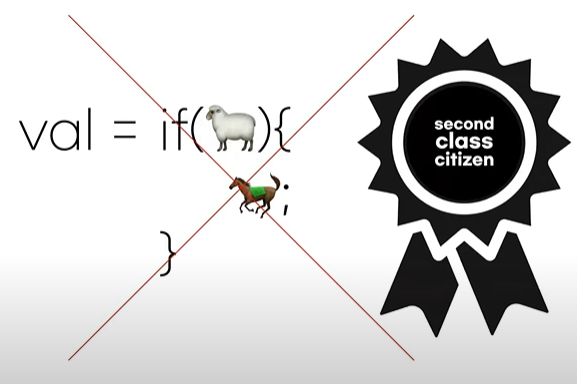
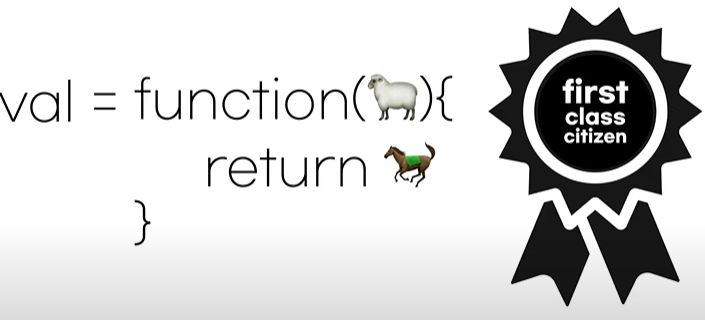
callback
자바스크립트에서 콜백이란 무엇이고, 콜백을 어떻게 사용하는지 알아봅니다.



Promise (then, catch)
비동기적으로 동작하는 함수들은 프라미스를 이용해서 제어해야 하는 경우가 많습니다. 동기적인 것과 비동기적인 것이 어떤 차이가 있는지, 프라미스로 되어 있는 함수는 어떻게 다뤄야 하는지를 알아보는 수업입니다.
fetch는 promise를 리턴
promise에는 then이나 catch를 달 수 있다.
fetch 리턴자리에 then을 붙여서 값을 확인해보면 response object가 출력된다.
<script>
fetch('https://jsonplaceholder.typicode.com/posts')
    .then(function (response) {
        console.log(response); //response object 출력
    })
</script>
response값을 json으로 변환을 하고
두 번째 then에서 json값을
<script>
fetch('https://jsonplaceholder.typicode.com/posts')
    .then(function (response) {
        return response.json();
    })
    .then(function (myJson) {
        console.log(myJson[0]); //object 이다. {userId: 1, id: 1....} 이렇게 출력됨
        console.log(JSON.stringify(myJson[0])); //string , {"userId": 1, "id" 1 ...} 이렇게 출력됨
    });
</script>
참고자료: https://devdocs.io/dom/fetch_api/using_fetch
async & await
promise를 사용하고 있는 비동기 함수를 동기 함수처럼 사용할 수 있게 해주는 도구인 async와 await에 대한 수업입니다.
학습목표:
timer(1000).then(function(time){

console.log(time);

})

위의 코드를 아래와 같이 바꿔보세요.

var time = await time(1000);
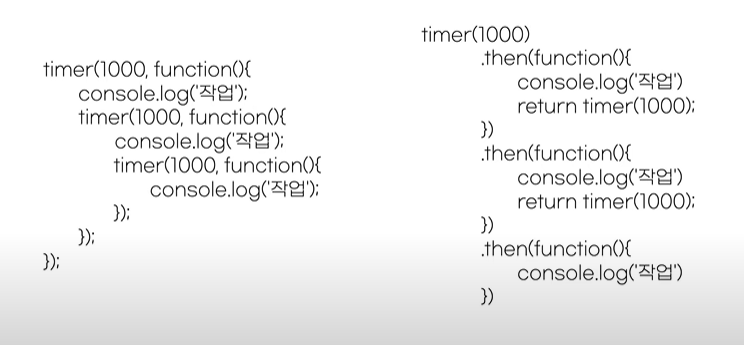

아래는 start 와 end 가 먼저 출력되고 time:1000, 2000, 3000 이 순차적으로 출력된다. promise는 비동기함수이기 때문.
<script>
function timer(time) {
    return new Promise(function (resolve) {
        setTimeout(function () {
            resolve(time);
        }, time);
    });
}

console.log('start');

timer(1000).then(function (time) {
    console.log('time: ' + time); //time: 1000
    return timer(time + 1000);
}).then(function (time) {
    console.log('time: ' + time); //time: 2000
    return timer(time + 1000);
}).then(function (time) {
    console.log('time: ' + time); //time: 3000
});

console.log('end');
</script>
async, await를 이용해서 동기적인 코드인것처럼 start -> time출력들 -> end 이렇게 출력되도록 만들어본다.
<script>
async function run() {
    console.log('start');
    var time = await timer(1000);
    console.log('time: ' + time);
    time = await timer(time + 1000);
    console.log('time: ' + time);
    time = await timer(time + 1000);
    console.log('time: ' + time);
    console.log('end');
}
run();
</script>
async 함수를 동기적으로 출력되도록 또 다시 async함수를 만들어서 써보기
<script>
async function run() {
    console.log('start');
    var time = await timer(1000);
    console.log('time: ' + time);
    time = await timer(time + 1000);
    console.log('time: ' + time);
    time = await timer(time + 1000);
    console.log('time: ' + time);
    console.log('end');
}
async function run2() { //run2 함수에 await가 있으니까 async를 붙인다.
    console.log('parent start');
    await run(); //async인 run함수는 promise를 리턴하기 때문에 비동기적이고 await를 또 붙일 수 있다!. 아니면 then을 붙여서 콜백함수를 써도 된다.
    console.log('parent end');
}
run2(); //parent start -> run함수 -> parent end 원하는 순서대로 출력된다.
</script>
async 함수에 return 값을 주고 변수에 할당할때
<script>
async function run() {
    console.log('start');
    var time = await timer(1000);
    console.log('time: ' + time);
    time = await timer(time + 1000);
    console.log('time: ' + time);
    time = await timer(time + 1000);
    console.log('time: ' + time);
    console.log('end');
    return time; //async 에 리턴값을 주면 아래 처럼
}
async function run2() {
    console.log('parent start');
    var time = await run(); //변수에 저장할 수 있다. syntatic sugar 이다.
    console.log('중간에 time 값이 출력되나? :' + time); //위의 time 값이 여기서 출력됨
    console.log('parent end');
}
console.log('parent parent start');
run2().then(function () {
    console.log('parent parent end');
});
// 출력결과
// parent parent start
// parent start
// start
// time: 1000
// time: 2000
// time: 3000
// end
// 중간에 time 값이 출력되나? :3000
// parent end
// parent parent end
</script>
Promise 2 - new Promise
자바스크립트에서 promise를 만드는 방법에 대한 수업입니다.
<script>
function 작업() {
    return new Promise((resolve, reject) => {
        setTimeout(() => {
            resolve(`작업 ok!`);
        }, 2000);
    });
}

function 추가작업() {
    return new Promise((resolve, reject) => {
        setTimeout(() => {
            resolve(`추가작업 ok!`);
        }, 2000);
    })
}

//Nested 방식
작업().then((data) => {
    console.log(`data: ${data}`); //2초 후 출력
    추가작업().then((data2) => {
        console.log(`data2: ${data2}`); // 그 2초 후 출력
    })
})

//Chaining 방식
작업()
    .then((data) => {
        console.log(`data: ${data}`); //2초 후 출력
        return 추가작업(); //then 안에서 promise를 리턴하면 된다.
    })
    .catch((reason) => { //위의 함수에서 reject 되면 catch 실행
        console.log(`reason: ${reason}`);
        return Promise.reject(); // promise rejecct을 리턴하면 위의 함수가 실패했을때 이 코드가 실행되고, 아래 코드는 실행X
    })
    .then((data2) => { // 그러면 또 then 사용가능
        console.log(`data2: ${data2}`); // 그 2초 후 출력
    })
    .catch((reason) => {
        //blah bla bla
    })
</script>
Promise All | Race - 동시작업을 단순하게!
'한번에 하나씩 하라' 일 잘하는 사람들의 비밀입니다.
그런데 왜 이 단순한 비밀을 자꾸 어기게 되는 것일까요?
한번에 여러개를 해야 빠르기 때문입니다.
그런데 왜 이 좋은 동시작업을 하지 말라고 할까요?
관리하기 어렵기 때문입니다.
우리의 꿈은 한번에 여러일을 하면서도 관리도 쉽게 하는 것입니다.
이를 가능하게 하는 꿈의 기술이 Promise.all과 race 입니다.
Promise의 극치를 경험해보세요. 동시작업에 자신감이 생길 것입니다.


<script>
function timer(time) {
    return new Promise(function (resolve, reject) {
        setTimeout(function () {
            resolve(time);
        }, time);
    });
}

console.time('Promise.all');
Promise.all([timer(1000), timer(2000), timer(3000)]).then(function (result) {
    console.log(`result : ${result}`); //result : 1000,2000,3000
    console.timeEnd('Promise.all'); //Promise.all: 3007.10595703125 ms
});

console.time('Promise.race');
Promise.race([timer(1000), timer(2000), timer(3000)]).then(function (result) {
    console.log(`result : ${result}`); //result : 1000
    console.timeEnd('Promise.race'); //Promise.race: 1001.39404296875 ms
});
</script>