Bootstrap Basic

Bootstrap Basic 1
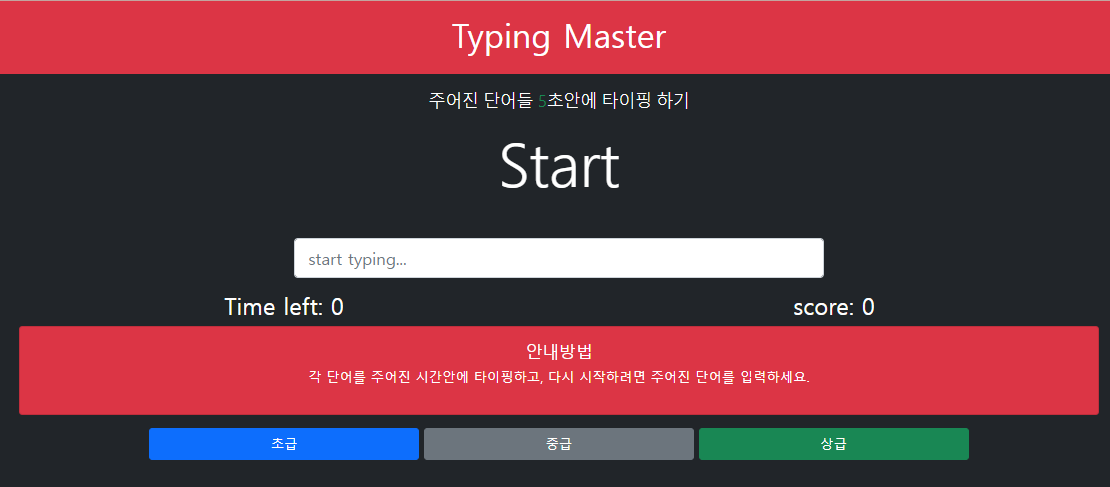
HTML 코드
코드에 나오는 class 개념정리
bg-dark : 배경색 검정색
text-white: 글자색 흰색
text-center: 글 정렬 중앙
p-3: 패딩 3단계
mb-3: margin-bottom 3단계
mx-auto : margin x축(가로) auto
row + col : row는 행, col은 열
col-12 : 한 열이 가로 한 칸을 다 차지
display-2 : 2배 확대
input 태그 안에서의
form-control: 폼 형식 사용
form-control-lg: 약간 큰 폼 형식 적용
card: card형식 사용
card-body: card형식중에 body적용
row > col-12, col-12, col-12 : 🍔같은 가로 3줄 생성. col-12가 default 값임.
row > col-md-4, col-md-4, col-md-4 : md 사이즈에서는 🟥🟩🟦와 같이 나옴, md사이즈 이전에는 🍔같은 가로 3줄 생성
btn : 버튼 적용
btn-primary: btn에 파란색상 적용
<!DOCTYPE html>
<html lang="en">

<head>
	<meta charset="UTF-8">
	<meta http-equiv="X-UA-Compatible" content="IE=edge">
	<meta name="viewport" content="width=device-width, initial-scale=1.0">
	<title>Typing Master</title>
	<link href="https://cdn.jsdelivr.net/npm/bootstrap@5.1.3/dist/css/bootstrap.min.css" rel="stylesheet"
		integrity="sha384-1BmE4kWBq78iYhFldvKuhfTAU6auU8tT94WrHftjDbrCEXSU1oBoqyl2QvZ6jIW3" crossorigin="anonymous">
</head>

<body class="bg-dark text-white">
<header class="bg-danger text-center p-3 mb-3">
    <h1>Typing Master</h1>
</header>

<div class="container text-center">

    <div class="row">
        <div class="col-md-6 mx-auto">
            <p class="lead">
                주어진 단어들 <span class="text-success">5</span>초안에 타이핑 하기
            </p>
            <h2 class="display-2 mb-5" id="current-word">Start</h2>
            <input type="text" class="form-control form-control-lg" placeholder="start typing..." id="wordInput">
            <h4 class="mt-3" id="message"></h4>
        </div>
    </div>

    <div class="row">
        <div class="col-12 col-xl-6">
            <h3>Time left: <span id="time">0</span></h3>
        </div>
        <div class="col-12 col-xl-6">
            <h3>score: <span id="score">0</span></h3>
        </div>
    </div>

    <div class="row">
        <div class="col">
            <div class="card card-body bg-danger text-white">
                <h5>안내방법</h5>
                <p>각 단어를 주어진 시간안에 타이핑하고, 다시 시작하려면 주어진 단어를 입력하세요.</p>
            </div>
        </div>
    </div>

    <div class="row mt-3">
        <div class="col-md-12">
            <button class="col-12 col-sm-3 btn btn-primary">초급</button>
            <button class="col-12 col-sm-3 btn btn-secondary">중급</button>
            <button class="col-12 col-sm-3 btn btn-success">상급</button>
        </div>
    </div>
</div>
</body>

</html>
Bootstrap Basic 2

실습 2 : https://ddiyongyong.github.io/devDignityBootstrap/
Carousel Template · Bootstrap v5.1
우리는 사진작업 전문 회사입니다. Some representative placeholder content for the first slide of the carousel. Sign up today
ddiyongyong.github.io
참고강의 : https://www.youtube.com/watch?v=5ETqQWvwXV4
HTML 코드
<!doctype html>
<html lang="en">
<head>
<meta charset="utf-8">
<meta name="viewport" content="width=device-width, initial-scale=1">
<meta name="description" content="">
<meta name="author" content="Mark Otto, Jacob Thornton, and Bootstrap contributors">
<meta name="generator" content="Hugo 0.88.1">
<title>Carousel Template · Bootstrap v5.1</title>
<link rel="canonical" href="https://getbootstrap.com/docs/5.1/examples/carousel/">
<!-- Bootstrap core CSS -->
<!-- <link href="/docs/5.1/dist/css/bootstrap.min.css" rel="stylesheet"
integrity="sha384-1BmE4kWBq78iYhFldvKuhfTAU6auU8tT94WrHftjDbrCEXSU1oBoqyl2QvZ6jIW3" crossorigin="anonymous"> -->
<link href="https://cdn.jsdelivr.net/npm/bootstrap@5.1.3/dist/css/bootstrap.min.css" rel="stylesheet"
integrity="sha384-1BmE4kWBq78iYhFldvKuhfTAU6auU8tT94WrHftjDbrCEXSU1oBoqyl2QvZ6jIW3" crossorigin="anonymous">
<!-- Favicons -->
<link rel="apple-touch-icon" href="/docs/5.1/assets/img/favicons/apple-touch-icon.png" sizes="180x180">
<link rel="icon" href="/docs/5.1/assets/img/favicons/favicon-32x32.png" sizes="32x32" type="image/png">
<link rel="icon" href="/docs/5.1/assets/img/favicons/favicon-16x16.png" sizes="16x16" type="image/png">
<link rel="manifest" href="/docs/5.1/assets/img/favicons/manifest.json">
<link rel="mask-icon" href="/docs/5.1/assets/img/favicons/safari-pinned-tab.svg" color="#7952b3">
<link rel="icon" href="/docs/5.1/assets/img/favicons/favicon.ico">
<meta name="theme-color" content="#7952b3">
<style>
.bd-placeholder-img {
font-size: 1.125rem;
text-anchor: middle;
-webkit-user-select: none;
-moz-user-select: none;
user-select: none;
}
@media (min-width: 768px) {
.bd-placeholder-img-lg {
font-size: 3.5rem;
}
}
</style>
<!-- Custom styles for this template -->
<link href="style.css" rel="stylesheet">
</head>
<body>
<header>
<nav class="navbar navbar-expand-md navbar-dark fixed-top bg-dark">
<div class="container-fluid">
<a class="navbar-brand" href="#">PhotoPro</a>
<button class="navbar-toggler" type="button" data-bs-toggle="collapse" data-bs-target="#navbarCollapse"
aria-controls="navbarCollapse" aria-expanded="false" aria-label="Toggle navigation">
<span class="navbar-toggler-icon"></span>
</button>
<div class="collapse navbar-collapse" id="navbarCollapse">
<ul class="navbar-nav me-auto mb-2 mb-md-0">
<li class="nav-item">
<a class="nav-link active" aria-current="page" href="#myCarousel">Home</a>
</li>
<li class="nav-item">
<a class="nav-link" href="#small3Img">Description</a>
</li>
<li class="nav-item">
<a class="nav-link" href="#section">Sections</a>
</li>
</ul>
<form class="d-flex">
<input class="form-control me-2" type="search" placeholder="Search" aria-label="Search">
<button class="btn btn-outline-success" type="submit">Search</button>
</form>
</div>
</div>
</nav>
</header>
<main>
<div id="myCarousel" class="carousel slide" data-bs-ride="carousel">
<div class="carousel-indicators">
<button type="button" data-bs-target="#myCarousel" data-bs-slide-to="0" class="active" aria-current="true"
aria-label="Slide 1"></button>
<button type="button" data-bs-target="#myCarousel" data-bs-slide-to="1" aria-label="Slide 2"></button>
<button type="button" data-bs-target="#myCarousel" data-bs-slide-to="2" aria-label="Slide 3"></button>
</div>
<div class="carousel-inner">
<div class="carousel-item active">
<img src=" img/ladderBackground.jpg" style="width: 100%; height: 100%;" alt="색감있는 배경 이미지 입니다">
<!-- <svg class="bd-placeholder-img" width="100%" height="100%" xmlns="http://www.w3.org/2000/svg"
aria-hidden="true" preserveAspectRatio="xMidYMid slice" focusable="false">
<rect width="100%" height="100%" fill="#777" />
</svg> -->
<div class="container">
<div class="carousel-caption text-start" style="background: rgba(200, 200, 200, 0.3);">
<h1>우리는 사진작업 전문 회사입니다.</h1>
<p>Some representative placeholder content for the first slide of the carousel.</p>
<p><a class="btn btn-lg btn-primary" href="#">Sign up today</a></p>
</div>
</div>
</div>
<div class="carousel-item">
<img src="img/birdBackground.jpg" style="width: 100%; height: 100%;" alt="색감있는 배경2 이미지 입니다">
<!-- <svg class="bd-placeholder-img" width="100%" height="100%" xmlns="http://www.w3.org/2000/svg"
aria-hidden="true" preserveAspectRatio="xMidYMid slice" focusable="false">
<rect width="100%" height="100%" fill="#777" />
</svg> -->
<div class="container">
<div class="carousel-caption" style="background: rgba(200, 200, 200, 0.3);">
<h1>Another example headline.</h1>
<p>Some representative placeholder content for the second slide of the carousel.</p>
<p><a class="btn btn-lg btn-primary" href="#">Learn more</a></p>
</div>
</div>
</div>
<div class="carousel-item">
<img src="img/background.jpg" style="width: 100%; height: 100%;" alt="색감있는 배경2 이미지 입니다">
<!-- <svg class="bd-placeholder-img" width="100%" height="100%" xmlns="http://www.w3.org/2000/svg"
aria-hidden="true" preserveAspectRatio="xMidYMid slice" focusable="false">
<rect width="100%" height="100%" fill="#777" />
</svg> -->
<div class="container">
<div class="carousel-caption text-end" style="background: rgba(200, 200, 200, 0.3);">
<h1>One more for good measure.</h1>
<p>Some representative placeholder content for the third slide of this carousel.</p>
<p><a class="btn btn-lg btn-primary" href="#">Browse gallery</a></p>
</div>
</div>
</div>
</div>
<button class="carousel-control-prev" type="button" data-bs-target="#myCarousel" data-bs-slide="prev">
<span class="carousel-control-prev-icon" aria-hidden="true"></span>
<span class="visually-hidden">Previous</span>
</button>
<button class="carousel-control-next" type="button" data-bs-target="#myCarousel" data-bs-slide="next">
<span class="carousel-control-next-icon" aria-hidden="true"></span>
<span class="visually-hidden">Next</span>
</button>
</div>
<!-- Marketing messaging and featurettes
================================================== -->
<!-- Wrap the rest of the page in another container to center all the content. -->
<div class="container marketing">
<!-- Three columns of text below the carousel -->
<div class="row" id="small3Img">
<div class="col-lg-4">
<img src="img/camera.jpg" style="width: 140px; height: 140px;" class="rounded-circle" alt="카메라 사진 입니다.">
<!-- <svg class="bd-placeholder-img rounded-circle" width="140" height="140" xmlns="http://www.w3.org/2000/svg"
role="img" aria-label="Placeholder: 140x140" preserveAspectRatio="xMidYMid slice" focusable="false">
<title>Placeholder</title>
<rect width="100%" height="100%" fill="#777" /><text x="50%" y="50%" fill="#777" dy=".3em">140x140</text>
</svg> -->
<h2>Professional</h2>
<p>Some representative placeholder content for the three columns of text below the carousel. This is the first
column.</p>
<p><a class="btn btn-secondary" href="#">View details »</a></p>
</div><!-- /.col-lg-4 -->
<div class="col-lg-4">
<img src="img/image-editing.jpg" style="width: 140px; height: 140px;" class="rounded-circle"
alt="편집하는 중인 사진 입니다.">
<!-- <svg class="bd-placeholder-img rounded-circle" width="140" height="140" xmlns="http://www.w3.org/2000/svg"
role="img" aria-label="Placeholder: 140x140" preserveAspectRatio="xMidYMid slice" focusable="false">
<title>Placeholder</title>
<rect width="100%" height="100%" fill="#777" /><text x="50%" y="50%" fill="#777" dy=".3em">140x140</text>
</svg> -->
<h2>Gears</h2>
<p>Another exciting bit of representative placeholder content. This time, we've moved on to the second column.
</p>
<p><a class="btn btn-secondary" href="#">View details »</a></p>
</div><!-- /.col-lg-4 -->
<div class="col-lg-4">
<img src="img/globe.jpg" style="width: 140px; height: 140px;" class="rounded-circle" alt="지구본 사진 입니다.">
<!-- <svg class="bd-placeholder-img rounded-circle" width="140" height="140" xmlns="http://www.w3.org/2000/svg"
role="img" aria-label="Placeholder: 140x140" preserveAspectRatio="xMidYMid slice" focusable="false">
<title>Placeholder</title>
<rect width="100%" height="100%" fill="#777" /><text x="50%" y="50%" fill="#777" dy=".3em">140x140</text>
</svg> -->
<h2>Fast</h2>
<p>And lastly this, the third column of representative placeholder content.</p>
<p><a class="btn btn-secondary" href="#">View details »</a></p>
</div><!-- /.col-lg-4 -->
</div><!-- /.row -->
<!-- START THE FEATURETTES -->
<hr class="featurette-divider">
<div class="row featurette" id="section">
<div class="col-md-7">
<h2 class="featurette-heading">협업을 최우선으로 여기며, <span class="text-muted">최고의 작업물을 만들어 냅니다.</span>
</h2>
<p class="lead">Some great placeholder content for the first featurette here. Imagine some exciting prose
here.</p>
</div>
<div class="col-md-5">
<img src="img/article1_startup.jpg" style="width: 500px; height: 500px; border-radius: 150px;"
alt="협업하는 사람들이 있는 사진입니다.">
<!-- <svg class="bd-placeholder-img bd-placeholder-img-lg featurette-image img-fluid mx-auto" width="500"
height="500" xmlns="http://www.w3.org/2000/svg" role="img" aria-label="Placeholder: 500x500"
preserveAspectRatio="xMidYMid slice" focusable="false">
<title>Placeholder</title>
<rect width="100%" height="100%" fill="#eee" /><text x="50%" y="50%" fill="#aaa" dy=".3em">500x500</text>
</svg> -->
</div>
</div>
<hr class="featurette-divider">
<div class="row featurette">
<div class="col-md-7 order-md-2">
<h2 class="featurette-heading">최신 장비들을 가지고 있습니다. <span class="text-muted">작업결과물의 완성도는 우수합니다.</span></h2>
<p class="lead">Another featurette? Of course. More placeholder content here to give you an idea of how this
layout would work with some actual real-world content in place.</p>
</div>
<div class="col-md-5 order-md-1">
<img src="img/article2_computer.jpg" style="width: 500px; height: 500px; border-radius: 150px;"
alt="컴퓨터 장비와 기타 장비가 있는 사진입니다.">
<!-- <svg class="bd-placeholder-img bd-placeholder-img-lg featurette-image img-fluid mx-auto" width="500"
height="500" xmlns="http://www.w3.org/2000/svg" role="img" aria-label="Placeholder: 500x500"
preserveAspectRatio="xMidYMid slice" focusable="false">
<title>Placeholder</title>
<rect width="100%" height="100%" fill="#eee" /><text x="50%" y="50%" fill="#aaa" dy=".3em">500x500</text>
</svg> -->
</div>
</div>
<hr class="featurette-divider">
<div class="row featurette">
<div class="col-md-7">
<h2 class="featurette-heading">작업결과물의 완성도를 위해 <span class="text-muted">직원복지가 훌륭합니다. </span></h2>
<p class="lead">And yes, this is the last block of representative placeholder content. Again, not really
intended to be actually read, simply here to give you a better view of what this would look like with some
actual content. Your content.</p>
</div>
<div class="col-md-5">
<img src="img/article3_sunset.jpg" style="width: 500px; height: 500px; border-radius: 150px;"
alt="해변에서 사람들이 환호하는 사진 입니다.">
<!-- <svg class="bd-placeholder-img bd-placeholder-img-lg featurette-image img-fluid mx-auto" width="500"
height="500" xmlns="http://www.w3.org/2000/svg" role="img" aria-label="Placeholder: 500x500"
preserveAspectRatio="xMidYMid slice" focusable="false">
<title>Placeholder</title>
<rect width="100%" height="100%" fill="#eee" /><text x="50%" y="50%" fill="#aaa" dy=".3em">500x500</text>
</svg> -->
</div>
</div>
<hr class="featurette-divider">
<!-- /END THE FEATURETTES -->
</div><!-- /.container -->
<!-- FOOTER -->
<footer class="container">
<p class="float-end"><a href="#">Back to top</a></p>
<p>© 2017–2021 Company, Inc. · <a href="#">Privacy</a> · <a href="#">Terms</a></p>
</footer>
</main>
<!-- <script src="/docs/5.1/dist/js/bootstrap.bundle.min.js"
integrity="sha384-ka7Sk0Gln4gmtz2MlQnikT1wXgYsOg+OMhuP+IlRH9sENBO0LRn5q+8nbTov4+1p"
crossorigin="anonymous"></script> -->
<script src="https://cdn.jsdelivr.net/npm/bootstrap@5.1.3/dist/js/bootstrap.bundle.min.js"
integrity="sha384-ka7Sk0Gln4gmtz2MlQnikT1wXgYsOg+OMhuP+IlRH9sENBO0LRn5q+8nbTov4+1p"
crossorigin="anonymous"></script>
<script src="https://cdn.jsdelivr.net/npm/@popperjs/core@2.10.2/dist/umd/popper.min.js"
integrity="sha384-7+zCNj/IqJ95wo16oMtfsKbZ9ccEh31eOz1HGyDuCQ6wgnyJNSYdrPa03rtR1zdB"
crossorigin="anonymous"></script>
<script src="https://cdn.jsdelivr.net/npm/bootstrap@5.1.3/dist/js/bootstrap.min.js"
integrity="sha384-QJHtvGhmr9XOIpI6YVutG+2QOK9T+ZnN4kzFN1RtK3zEFEIsxhlmWl5/YESvpZ13"
crossorigin="anonymous"></script>
</body>
</html>
CSS 코드
/* GLOBAL STYLES
-------------------------------------------------- */
/* Padding below the footer and lighter body text */

body {
  padding-top: 3rem;
  padding-bottom: 3rem;
  color: #5a5a5a;
}

/* CUSTOMIZE THE CAROUSEL
-------------------------------------------------- */

/* Carousel base class */
.carousel {
  margin-bottom: 4rem;
}
/* Since positioning the image, we need to help out the caption */
.carousel-caption {
  bottom: 3rem;
  z-index: 10;
}

/* Declare heights because of positioning of img element */
.carousel-item {
  height: 32rem;
}
.carousel-item > img {
  position: absolute;
  top: 0;
  left: 0;
  min-width: 100%;
  height: 32rem;
}

/* MARKETING CONTENT
-------------------------------------------------- */

/* Center align the text within the three columns below the carousel */
.marketing .col-lg-4 {
  margin-bottom: 1.5rem;
  text-align: center;
}
.marketing h2 {
  font-weight: 400;
}
/* rtl:begin:ignore */
.marketing .col-lg-4 p {
  margin-right: 0.75rem;
  margin-left: 0.75rem;
}
/* rtl:end:ignore */

/* Featurettes
------------------------- */

.featurette-divider {
  margin: 5rem 0; /* Space out the Bootstrap <hr> more */
}

/* Thin out the marketing headings */
.featurette-heading {
  font-weight: 300;
  line-height: 1;
  /* rtl:remove */
  letter-spacing: -0.05rem;
}

/* RESPONSIVE CSS
-------------------------------------------------- */

@media (min-width: 40em) {
  /* Bump up size of carousel content */
  .carousel-caption p {
    margin-bottom: 1.25rem;
    font-size: 1.25rem;
    line-height: 1.4;
  }

  .featurette-heading {
    font-size: 50px;
  }
}

@media (min-width: 62em) {
  .featurette-heading {
    margin-top: 7rem;
  }
}