WEB/Html & Css
TODO HTML/CSS
Harimad
2022. 6. 13. 20:55
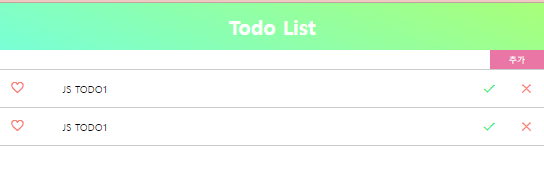
목표
실습 결과를 만들기 위해
1. html 시멘틱 태그를 이해하고 사용한다.
2. 적절한 css 스타일을 적용한다.
HTML 코드
<!DOCTYPE html>
<html lang="ko">

<head>
	<meta charset="UTF-8">
	<meta http-equiv="X-UA-Compatible" content="IE=edge">
	<meta name="viewport" content="width=device-width, initial-scale=1.0">
	<title>Todo List</title>
	<link rel="stylesheet" href="style.css">
	<!-- Google Material Icons CDN -->
	<link href="https://fonts.googleapis.com/icon?family=Material+Icons" rel="stylesheet">
</head>

<body>
<div class="wrapper">
    <!-- HEADER START -->
    <header>
        <h1>Todo List</h1>
    </header>
    <!-- HEADER END -->

    <!-- SECTION START -->
    <section>
        <!-- INPUT-CONTAINER START -->
        <div class="input-container">
            <input type="text" class="input-text">
            <button class="add-button">추가</button>
        </div>
        <!-- INPUT-CONTAINER END -->

        <!-- LIST-CONTAINER START -->
        <div class="list-container">
            <ul class="list">
                <li>
                    <span class="like">
                        <i class="material-icons favorite">favorite_border</i>
                    </span>
                    <span class="item">JS TODO1</span>
                    <span class="manage">
                        <i class="material-icons check">done</i>
                        <i class="material-icons clear">clear</i>
                    </span>
                </li>
            </ul>
        </div>
        <!-- LIST-CONTAINER END -->
    </section>
    <!-- SECTION END -->
</div>

<script src="main.js"></script>
</body>

</html>
CSS 코드
CHECK POINT
1. initializing CSS
2. 세로로 줄세우기 : display: flex & flex-direction
3. 그림자 템플릿 사이트 : https://uigradients.com/
4. 세로상 가운데로 정렬 : display:flex & align-items: center
5. display:flex 안의 요소 3개를 1:8:1로 나누기
flex:1 & flex: 8 & flex: 1
6. toggle class 넣기
동적(토글)으로 하위 태그에 스타일을 주고싶다면, 상위태그에 스타일을 미리 만들어 놓는다.
예) .list li .ltem 태그에 스타일을 주고 싶다면, 미리 .list li.done .item 에 스타일을 만들어 놓는다.
.done .item { text-decoration: line-through; }
/* Initialize */
* {
  margin: 0;
  padding: 0;
  outline: none;
}
li {
  list-style: none;
}

.wrapper {
  height: 100vh;
  width: 100%;
  /* 아이템 세로로 줄 세우기 */
  display: flex;
  flex-direction: column;
}

header {
  color: white;

  /* UI_Gradient.com */
  background: linear-gradient(20deg, #78ffd6, #a8ff78);
  padding: 1rem;

  /* 가운데로 위치*/
  display: flex;
  justify-content: center;
  align-items: center;
}

.input-container {
  width: 100%;
  height: 30px;
  /* 위 아래로 꽉차게 stretch 된다. */
  display: flex;
  border-bottom: 1px solid #ccc;
}

.input-text {
  width: 90%;
  padding: 0.3rem;
  border: none;
}
.add-button {
  width: 10%;
  background: #ea76a5;
  color: #fff;
  /* 버튼 클릭 시 사라지지 않는 테두리를 없을 때 */
  border: none;
  outline: none;
}
.add-button:hover {
  cursor: pointer;
  background-color: #ff0066;
}

.list li {
  display: flex;
  border-bottom: 1px solid #ccc;
  padding: 1em;
  align-items: center;
}
.like {
  flex: 1;
}
.item {
  flex: 8;
}
.manage {
  flex: 1;
  display: flex;
  justify-content: space-between;
}

.like i {
  color: salmon;
}
.check {
  color: #38ef7d;
}
.clear {
  color: salmon;
}

/* .list li 에 넣을 토글 클래스 설정 */
.done .item {
  text-decoration: line-through;
}
.done .check {
  visibility: hidden;
}