그래프 - Graphs

목차
1. 그래프 소개
2. 그래프의 이용
3. 그래프의 유형
4. 그래프 정렬 : 인접 행렬
5. 그래프 정렬 : 인접 리스트
6. 인접 행렬 vs. 리스트의 빅오 (BIG O)
7. 점(vertex) 추가에 대한 소개
8. 점(vertex) 추가 솔루션
9. 선(edge) 추가에 대한 소개
10. 선(edge) 추가 솔루션
11. 선(edge) 제거에 대한 소개
12. 선(edge) 제거 솔루션
13. 점(vertex) 제거에 대한 소개
14. 점(vertex) 제거 솔루션
1. 그래프 소개
https://cs.slides.com/colt_steele/graphs
Graphs
A presentation created with Slides.
cs.slides.com
그래프는 유한하고 변할 수 있는 꼭지점이나 노드나 점들의 집합으로 구선된 데이터 구조이다.
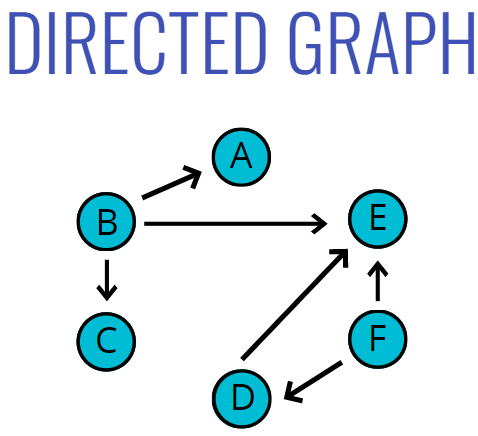
이 꼭지점들의 집합에 순서가 없는 경우에는 무방향 그래프, 순서가 있는 경우에는 유방향 그래프라고 한다.
Graph === Nodes + Connections
2. 그래프의 이용
Musicmap | The Genealogy and History of Popular Music Genres
Musicmap provides the ultimate genealogy of all popular music genres and combines any information regarding music genres, such as their relations, sociology, history and music examples, in one dynamic map, serving as both an educational tool and a framewor
www.musicmap.info
- Social Networks
- Location / Mapping
- Routing Algorithms
- Visual Hierarchy
- File System Optimizations
- EVERYWHERE :)
3. 그래프의 유형
정점(Vertex) - 노드
간선(Edge) - 노드 사이의 연결
가중(Weighted) / 비가중(Unweighted) - values assigned to distances between vertices
방향(Directed) / 무방향(Undirected) - directions assigned to distanced between vertices


4. 그래프 정렬 : 인접 행렬

5. 그래프 정렬 : 인접 리스트


6. 인접 행렬 vs. 리스트의 빅오 (BIG O)

인접 행렬은 빅오의 값이 정점의 개수 제곱(V²)이다. 행렬이 2차원 구조 이기 때문이다.
새로운 정점을 추가하면 한 칸을 더하는 것이 아니라
행에 한 줄, 열에 한 줄을 추가하는 것이다.
이와 인접 리스트를 비교하면,
인접 리스트에서는 그냥 간선(Vertex)과 정점(Edge)의 개수에 비례하여 증가한다.
크기, 즉 저장공간은 간선의 개수에 따라 결정된다.
배열은 간선의 개수와는 상관이 없다. 정점이 몇 개 있는지에 따라 달라진다.

∴ 여기서는 인접 리스트를 사용할 예정이다.
이유? 차지하는 공간 때문이다.
실제로 세상에서 사용되는 데이터 대부분 퍼져있는 경우가 더 많다 (SNS친구, 위키피디아 문서들 등등)
노드의 개수, 즉 정점의 개수는 아주 많지만 그게 서로 다 연결 되어 있지 않은 경우가 더 많다.
그래서 인접 리스트가 더 매력적이다.
간선의 숫자에 따라 행렬을 만들면 아주 큰 공간이 된다.
데이터가 집약적이어서 행렬이 거의 꽉 차는 경우에는 행렬을 사용하는게 더 낫지만, 그렇지 않으면 인접 리스트를 사용하는게 더 낫다.
7. 점(vertex) 추가에 대한 소개
의사코드
1. addVertex라는 이름의 메서드를 만들고, 정점의 이름을 인자로 받는다.
2. 정점의 이름으로 인접 리스트의 key를 추가한다. 그리고 value로 빈 배열을 설정한다.
g.addVertex('Tokyo') => { " Tokyo " : [ ] }
8. 점(vertex) 추가 솔루션
class Graph{
    constructor(){
        this.adjacencyList = {};
    }
    addVertex(vertex){
        if(!this.adjacencyList[vertex]) this.adjacencyList[vertex] = [];
    }
}

let g = new Graph();
g.addVertex("Dallas");
g.addVertex("Tokyo");
g.addVertex("Aspen");

g.adjacencyList;
// 결과
// Aspen: []
// Dallas: []
// Tokyo: []
9. 선(edge) 추가에 대한 소개
의사 코드
1. 두 정점을 인자로 받는 함수를 만는데, vertex1과 vertex2로 이름 짓는다.
2. 이 함수는 인접 리스트에서 vertex1의 key를 찾아서 vertex2를 그 배열에 넣어 준다.
3. 2번과 똑같이 인접 리스트에서 vertex2의 key를 찾아서 vertex1을 그 배열에 넣어준다.
예시

10. 선(edge) 추가 솔루션
class Graph{
    constructor(){
        this.adjacencyList = {};
    }
    addVertex(vertex){
        if(!this.adjacencyList[vertex]) this.adjacencyList[vertex] = [];
    }
    addEdge(v1,v2){
        this.adjacencyList[v1].push(v2);
        this.adjacencyList[v2].push(v1);
    }
}

let g = new Graph();
g.addVertex("Dallas");
g.addVertex("Tokyo");
g.addVertex("Aspen");

g.addEdge("Dallas", "Tokyo");
g.addEdge("Dallas", "Aspen");

g.adjacencyList;
// 결과
// Aspen: ['Dallas']
// Dallas: (2) ['Tokyo', 'Aspen']
// Tokyo: ['Dallas']
11. 선(edge) 제거에 대한 소개
의사 코드
1. removeEdge 라는 이름으로 메소드 작성, 두 개의 정점(vertex1, vertex2)을 인자로 받는다.
2. 정점1에 있는 key에 대해 전에 있던 것은 그대로 있지만, 정점2를 제거한 배열을 다시 부여한다. (filter 메서드 사용)
3. 2번과 같이 정점2에 있는 key에 대해 전에 있던 건 그대로지만, 정점1을 제거한 배열을 다시 부여한다. ( " ")
예시

12. 선(edge) 제거 솔루션
class Graph{
    constructor(){
        this.adjacencyList = {};
    }
    addVertex(vertex){
        if(!this.adjacencyList[vertex]) this.adjacencyList[vertex] = [];
    }
    addEdge(v1,v2){
        this.adjacencyList[v1].push(v2);
        this.adjacencyList[v2].push(v1);
    }
    removeEdge(vertex1,vertex2){
        this.adjacencyList[vertex1] = this.adjacencyList[vertex1].filter(
            v => v !== vertex2
        );
        this.adjacencyList[vertex2] = this.adjacencyList[vertex2].filter(
            v => v !== vertex1
        );
    }
}

let g = new Graph();
g.addVertex("Dallas");
g.addVertex("Tokyo");
g.addVertex("Aspen");

g.addEdge("Dallas", "Tokyo");
g.addEdge("Dallas", "Aspen");

g.adjacencyList;
// 결과
// Aspen: ['Dallas']
// Dallas: (2) ['Tokyo', 'Aspen']
// Tokyo: ['Dallas']

g.removeEdge("Tokyo", "Dallas");

g.adjacencyList;
// 결과
// Aspen: ['Dallas']
// Dallas: ['Aspen']
// Tokyo: []
13. 점(vertex) 제거에 대한 소개
의사 코드
1. 제거할 정점을 인자로 받는 removeVertex라는 함수를 작성.
2. adjacencyList에 다른 정점이 있다면 해당 정점인지 확인하기 위해 모두 루프를 돈다.
예) 홍콩이 인접 리스트에 있고, 그 목록에 10개의 간선, 즉 다른 도시들이 있다면 그 각각에 대해 루프를 돌면서 각각의 연결점(간선)을 제거해준다.
3. 루프 안에서는 미리 정의한 removeEdge 함수를 사용한다. 해당 정점에 있는 모든 간선에 대해 모두 removeEdge를 호출해서 제거한다.
4. 마지막으로 adjacencyList에서 key를 삭제한다.
예시

14. 점(vertex) 제거 솔루션
class Graph{
    constructor(){
        this.adjacencyList = {};
    }
    addVertex(vertex){
        if(!this.adjacencyList[vertex]) this.adjacencyList[vertex] = [];
    }
    addEdge(v1,v2){
        this.adjacencyList[v1].push(v2);
        this.adjacencyList[v2].push(v1);
    }
    removeEdge(vertex1,vertex2){
        this.adjacencyList[vertex1] = this.adjacencyList[vertex1].filter(
            v => v !== vertex2
        );
        this.adjacencyList[vertex2] = this.adjacencyList[vertex2].filter(
            v => v !== vertex1
        );
    }
    removeVertex(vertex){
        while(this.adjacencyList[vertex].length){
            const adjacentVertex = this.adjacencyList[vertex].pop();
            this.removeEdge(vertex, adjacentVertex);
        }
        delete this.adjacencyList[vertex]
    }
}

let g = new Graph();

g.addVertex("Dallas");
g.addVertex("Tokyo");
g.addVertex("Aspen");
g.addVertex("Los Angeles");
g.addVertex("Hong Kong")

g.addEdge("Dallas", "Tokyo");
g.addEdge("Dallas", "Aspen");
g.addEdge("Hong Kong", "Tokyo");
g.addEdge("Hong Kong", "Dallas");
g.addEdge("Los Angeles", "Hong Kong");
g.addEdge("Los Angeles", "Aspen");

g.adjacencyList;
// 결과
// Aspen: (2) ['Dallas', 'Los Angeles']
// Dallas: (3) ['Tokyo', 'Aspen', 'Hong Kong']
// Hong Kong: (3) ['Tokyo', 'Dallas', 'Los Angeles']
// Los Angeles: (2) ['Hong Kong', 'Aspen']
// Tokyo: (2) ['Dallas', 'Hong Kong']

g.removeVertex("Hong Kong");

g.adjacencyList;
// 결과
// Aspen: (2) ['Dallas', 'Los Angeles']
// Dallas: (2) ['Tokyo', 'Aspen']
// Los Angeles: ['Aspen']
// Tokyo: ['Dallas']