zeroCho[6/8] 틱택토 - const [state, dispatch] = useReducer(reducer, initialState), action

목차
[0/8] 구구단 - state, JSX, babel, Fragment, setState, ref
[1/8] 끝말잇기 - useState, class component vs function component, webpack, module, build
[1/8] 끝말잇기 - useState, class component vs function component, webpack, module, build
[2/8] 숫자야구. 3-1. import와 require 비교
[2/8] 숫자야구 - map, key, 컴포넌트분리, props, 메서드바인딩(this), 동작원리, 구조분해, 이벤트
[3/8] 반응속도체크 - createRoot, useEffect, useRef, 조건문, return 내부 for과 if 쓰기
[4/8] Rock Scissors Paper - LifeCycle, closure, 비동기함수, 고차함수, useEffect를 이용한 lifeCycle,
[5/8] Lotto - componentDidUpdate, useEffect, useMemo, useCallback
강의목차
7-1. 틱택토와 useRedcuer 소개
7-2. reducer, action. dispatch의 관계
7-3. action 만들어 dispatch 하기
7-4. 틱택토 구현하기
7-5. 테이블 최적화하기
7-1. 틱택토와 useRedcuer 소개
Q. useReducer를 쓰는 이유?
useReducer 를 배우면 redux를 쓰는것 같은 효과를 낼 수 있다.
작은 간단한 프로젝트에서는 두 개로 사용해서 redux기능을 흉내내도된다.
useReducer , ContextAPI
큰 프로젝트 때는 redux를 무조건 써야한다.
비동기 부분 처리를 위해 결국 리덕스를 써야한다.
이번 프로젝트의 컴포넌트 구조
table
tr
td td td
tr
td td td
tr
td td td
tip - 작은 컴포넌트부터 만들어 가는게 좋다. => Td -> Tr -> Table -> TicTacToe(부모컴포넌트)
틱택토 게임규칙
O -> X -> O -> X 순서로 3x3 에 두어서 승자를 겨룬다.
이번 프로젝트에서는 3x3을 누르면 Td 컴포넌트부분이 눌러지는 것이기 때문에
TixTacToe -> Table -> Tr -> Td로 state들을 넘겨줘야한다. 중간에 2단계를 더 거쳐서 데이터를 넘겨야한다.
효율적으로 데이터를 넘기는 방법이 ContextAPI 이다. 이건 다음 시간에 해볼 예정이다.
이번에는 state자체를 줄이는 useReducer를 써볼 예정이다.
state와 setState들이 늘어 나면 관리하기 힘들고 props로 넘기기도 힘들다.
useReducer를 쓰면 하나의 state와 setState로 만들어서 props로 넘길 수 있다.
코드
import React, { useReducer } from 'react'
import Table from './Table'

const initialState = {
  winner: '',
  turn: '0',
  tableData: [
    ['', '', ''],
    ['', '', ''],
    ['', '', ''],
  ],
}

const reducer = (state, action) => {}

const TicTacToe = () => {
  const [state, dispatch] = useReducer(reducer, initialState)

  // const [winner, setWinner] = useState('')
  // const [turn, setTurn] = useState('0')
  // const [tableData, setTableData] = useState([
  //   ['', '', ''],
  //   ['', '', ''],
  //   ['', '', ''],
  // ])

  return (
    <>
      <Table />
      {winner && <div>{winner}님의 승리</div>}
    </>
  )
}
export default TicTacToe
7-2. reducer, action. dispatch의 관계
깃 링크 : https://github.com/Harimad/zeroReact/commit/0dda24ae0a89b7bed0a66a1b0419f03c1b766edf
컴포넌트의 return에서
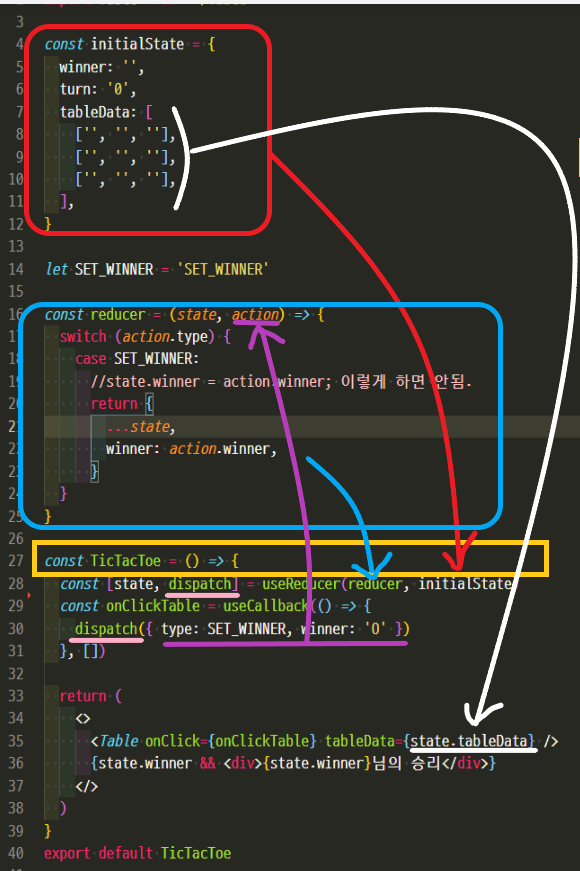
state.winner 로 initialState접근 가능하다.
dispatch syntax
dispatch( { reducer의 action객체} )

dispatch( { type: 'SET_WINNER', winner: '0' } )
액션을 해석해서 state를 직접 바꿔주는 역할이 바로 reducer 함수이다.
const reducer = ( state, action ) => {
  switch (action.type) {
    case 'SET_WINNER':
      // state.winner = action.winner; 이렇게 state값을 직접적으로 바꾸면 안된다. 불변성을 지켜야한다.
      return { // 새로운 객체를 만들고 리턴해서 값을 갈아끼워야한다.
        ...state,  // 기존 객체 복사
        winner: action.winner,  // 바뀐 부분만 바꿔준다 -> 이걸 불변성 이라고 한다.
      }
  }
}
불변성을 유지하는 것이란
기존 state를 바꾸는게 아니라
새로운 state를 만들어서 바뀌는 부분만 바꿔주는 것이다.
참고: 2022.04.14 - [WEB/React] - 불변성
기존의 state가 있다고 하자.
아무도 state를 직접 손댈 수 없다.
무조건 action을 만들어서 state값에 dispatch해야한다.
이걸 reducer 함수에서 관리 해준다. (state변경을 여기서한다.)
틱택토 파일구조
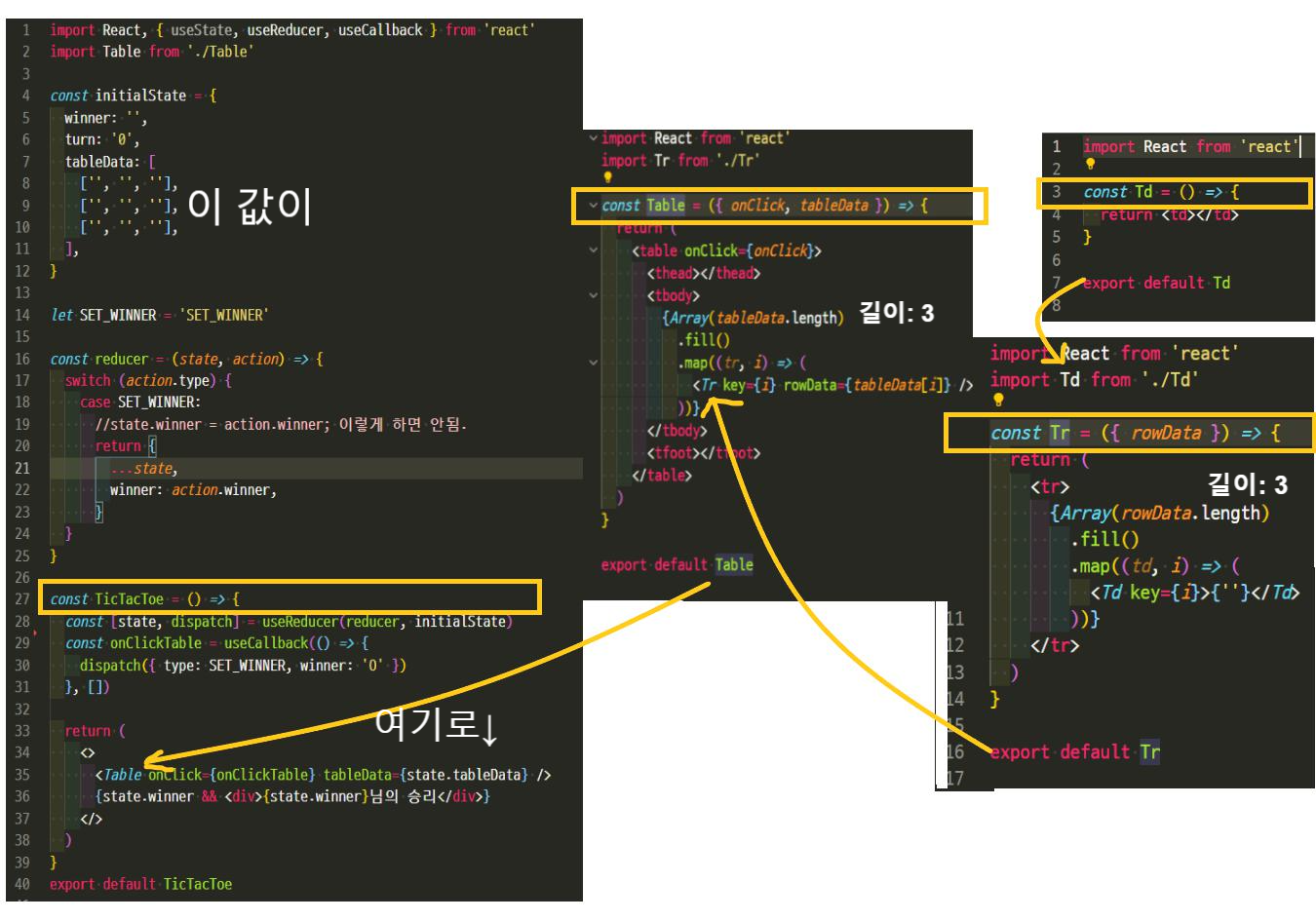
TicTacToe 컴포넌트
실행결과

7-3. action 만들어 dispatch 하기
깃 링크: https://github.com/Harimad/zeroReact/commit/64149f4d91587d840e0cea50cfce26bee4996eda
Q. CLICK_CELL 불변성위해 state값 복사하는거 좀 더 자세하게 설명부탁드립니다..
const reducer = (state, action) => {
  switch (action.type) {
    case CLICK_CELL: {
      const tableData = [...state.tableData]
      tableData[action.row] = [...tableData[action.row]]
      tableData[action.row][action.cell] = state.turn
      return {
        ...state,
        tableData,
        recentCell: [action.row, action.cell],
      }
    }
  }
}
이부분 내부 데이터를 바꾸려고 상수하나 만들어서 거기에 table state 값 복사하는
const tableData = [...state.tableData]; 는 이해해였습니다.
tableData[action.row] = [...tableData[action.row]] 를 한번더 값을 복사하는지 이해가 안되네요..
또 아래 return {
...state,
tableData
}
에서 tableData는 state의 tableData가 아니라 새로생성한 tableData const값이 들어가는거같은데.
React에서 자동적으로 감지해서 바꿔주는건가요?
그럼 const tableData 값의 이름이 다르면 감지못하는건지..
-> tableData는 이차원 배열입니다. [[], []] 이런 모양인데요.
바깥쪽 []랑, 안쪽 []랑 모두 객체라서 불변성을 지켜야 합니다.
const tableData = [...state.tableData]; 는 바깥쪽.
tableData[action.row] = [...tableData[action.row]] 는 안쪽입니다.
또한 return도 마찬가지입니다. tableData를 불변성 지켜진 데이터로 수정해야 합니다. 그게 const tableData이고요.
7-4. 틱택토 구현하기
깃 링크 : https://github.com/Harimad/zeroReact/commit/4826bdfadf99862d3d373b00db6909ceb601b537
JS 틱택토 참고해서 로직 이해하기
7-5. 테이블 최적화하기
깃 링크 : https://github.com/Harimad/zeroReact/commit/affdb03e8ca20b65e3837353424ebfd41173a25a
Td 와 Tr 컴포넌트에 memo를 붙여서 성능 최적화를 시킴